Build Molecules - Molecule Lab: A Comprehensive Review
Screenshots


Introduction
Build Molecules - Molecule Lab is an innovative mobile application designed for students, educators, and chemistry enthusiasts looking to explore the fascinating world of chemistry through an interactive and hands-on approach. Developed by jruanobl, this app allows users to construct and visualize molecular structures using a simple drag-and-drop interface. It caters to users of all levels, making complex chemistry concepts accessible and enjoyable. With features such as smart chemical bonding, a wide variety of atoms, and an extensive database of recognizable molecules, this app serves as an excellent educational tool for anyone interested in chemistry.
Graphics & Gameplay
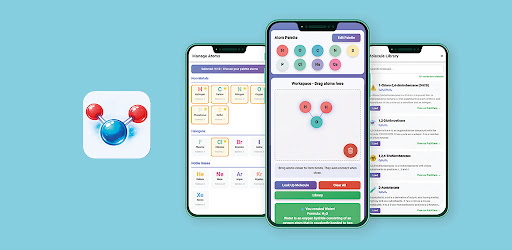
The visuals of Build Molecules - Molecule Lab are designed to be engaging and intuitive, ensuring that users can easily navigate through the application while enjoying the process of molecule building. The interface features a clean layout with a vibrant color palette, making it visually appealing to users. The atom palette is well-organized, showcasing various categories of atoms such as non-metals, halogens, noble gases, and more, allowing users to quickly find the atoms they need.
As seen in the provided screenshots, the drag-and-drop functionality works seamlessly, enabling users to place atoms into the workspace effortlessly. Real-time bond rendering enhances the gameplay experience, with bonds appearing dynamically as atoms come close to each other. The workspace is designed to be responsive, accommodating both mobile and larger screen devices, ensuring a smooth experience regardless of the platform.
Key Features
- Drag-and-Drop Building: Build molecules by easily dragging atoms from the atom palette into the workspace, compatible with touch and mouse controls.
- Smart Chemical Bonding: Atoms automatically bond based on their proximity, adhering to valence rules and supporting single, double, and triple bonds.
- 40+ Atoms in 8 Categories: Explore over 40 different atoms organized by category, each with its symbol, name, and valence value for easy reference.
- 100+ Molecule Recognition: Instantly recognize and learn about over 100 known molecules, including basic compounds, hydrocarbons, acids, and organic compounds, with detailed information accessible via direct PubChem links.
- Molecule Library: Access a built-in library of predefined molecules for study and modification, enhancing the educational experience.
- Custom Atom Palette: Personalize your atom palette with up to 10 selected atoms for quicker access, with your selections saved between sessions.
- Visual Bond Rendering: Bonds are visually represented in real-time, providing clarity for both novice and advanced users.
- Educational Support: Utilize real-time molecular formula generation and quick access to common compounds for an enhanced learning experience.
Mod Features
For users seeking an enhanced experience, several mod features could be beneficial:
- Premium Unlocked: Gain access to all premium features without any restrictions, allowing for an uninterrupted learning journey.
- No Ads: Enjoy an ad-free experience while using the app, making it easier to focus on molecule building and learning.
- Unlimited Money: Access unlimited resources within the app, enabling users to customize their atom palette and explore all features without limitations.
- Exclusive Molecule Packs: Unlock additional packs of rare and complex molecules, providing users with more options for exploration and learning.
How to Install APK on Android
Installing the Build Molecules - Molecule Lab APK on your Android device is straightforward. Follow these steps to get started:
- Enable Unknown Sources: Go to your device's settings, navigate to Security, and enable the option to allow installations from unknown sources.
- Download the APK: Visit the provided download link for the Build Molecules APK and save the file to your device.
- Locate the APK File: Use a file manager to find the downloaded APK file in your device's storage.
- Install the App: Tap on the APK file and follow the on-screen instructions to complete the installation process.
- Launch the App: Once installed, you can find the app icon on your device's home screen or app drawer. Tap to launch and start building molecules!
Conclusion
Build Molecules - Molecule Lab is an exceptional tool for anyone interested in chemistry, offering a unique way to learn through interactive molecular construction. With its user-friendly interface, extensive features, and educational support, the app is perfect for students, teachers, and hobbyists alike. If you’re ready to dive into the world of molecules and enhance your chemistry knowledge, don’t hesitate to download the app today!
Download Link: Click here to download Build Molecules - Molecule Lab!